This design narrative follows the conception, prototyping, and testing of a virtual closet app designed by myself and a partner, Alexis, for our Honors User Interface Design course at UNL. It offers an in-depth look at the process of our design and the lessons we learned along the way. The prototype was created from scratch using Figma, and an interactive version can be found at the bottom of the page. Thanks for reading!
I think one of the most important assets of working on a team is the ability to take advantage of skills and experiences that are unique to your team members. With the looming deadline to declare a topic for a semester-long assignment to create a fully functioning user interface, I was cycling through random ideas and getting frustrated with the growing number of possibilities I came up with in the face of the complete freedom to choose my own topic. Alexis, a friend of mine who I knew through a school club, was also in class with me. During the first few weeks of the semester, I learned things about her like that her dad was from Sweden and her mom was from New Mexico, that her birthday is on Christmas but she doesn’t mind, and that she writes left-handed with her notebook completely sideways. I also learned that she had a minor in fashion design and sewing, and I grabbed my phone to text her as soon as the idea came into my mind: an app that could create a digital version of your closet, allowing users to generate outfit combinations and see how pieces fit together without having to spend time trying them on. Normally, I wouldn’t be confident enough to go with an idea that I didn’t have background knowledge in, but thankfully Alexis was willing to partner with me for the project, and the idea was able to come to fruition thanks to her experience in clothing design. The concept for this app was born out of necessity and inspiration, but mostly it was born out of the opportunity to take advantage of Alexis’ interests and learn about a new industry I was foreign to. Yes, I needed a good project idea so I could do well in the class, and yes, I also like clothes and think fashion is a fun creative outlet – but I think the motivation and passion behind this project comes from our teamwork and collaboration more so than anything. We both brought so many different ideas and perspectives to the table, and the development of this prototype definitely reflects the passion we both had for the project.
Concept
A digital catalog of your personal closet that would allow you to create outfits and see how items complement each other without having to physically try them on
My original idea was just a feature. It was a pain point I experienced frequently — picking an outfit could easily become a 30 minute ordeal when there are so many options and combinations to try. When I brought the idea to Alexis, we immediately continued brainstorming more features. With a digital closet, you could log your outfit of the day, share outfits with your friends, follow stylists and celebrities to see what they were wearing, and plan out ideas into the future to save time. We carefully considered the important choices we learned about in class:
Target Population
Our target population was decidedly teens and young adults with an interest in fashion. We relied heavily on social media app conventions in our design, so the population would need to be fluent in these conventions. Hypothetically, the users would also need the tech fluency to successfully upload photos of all of their clothes, which would also take significant time and effort, meaning our users would have to be dedicated to fashion/clothing. Being a tech native would be a benefit, so we focused on Gen Z and Millennials in our design.
Device
We decided on a mobile app for this concept to most easily facilitate the key features of our idea – the social media aspect and the act of uploading clothes and outfits with a camera. Social media apps need to be easily accessible so that users can quickly access the app throughout the day to check their feed, meaning mobile was the best choice. The advanced camera on smart phones would also need to be used in the creation of the digital closet.
Interviews
In order to refine the concept and get ideas for user stories, Alexis and I conducted 4 preliminary interviews with members of our target population. Below is a list of the questions asked of the participants. From this stage, we gathered ideas like integrated weather forecasting, sorting clothing by the situation or level of formalness, and several more that we wouldn’t have been able to come up with alone.
| How do you typically plan/pick outfits? |
| Where do you get style inspiration? |
| Is there anywhere you can save other peoples styles/clothes, or would you use that feature if it was available to you? |
| What is the worst part about planning outfits/shopping for clothes? |
| How do you feel about your current style? Is it a reflection of you? |
| Rate importance to you between: Sustainability, Trends, Style, Efficiency/Convenience, Creativity |
| Are there items in your closet that you never wear/wear infrequently? |
| Are there items in your closet that you don’t wear because nothing goes with them or you aren’t sure how to style them? |
| Do you ever feel like you wear the same ‘uniform’ every day because planning new outfits takes time/energy? |
| Do you ever donate your old clothes? If yes, how often? Is it difficult to know where to go? |
| Do you try to integrate sustainability in your life? |
| Would you be interested in making your closet/clothes shopping more sustainable and environmentally friendly? |
| Given a digital version of your clothes, what is the first thing you think of doing? |
| If the app required you to hang each item of clothing in front of a blank background, how difficult or time consuming does that sound? |
User Stories
In order to get an idea of our user base, Alexis and I created a list of more than a dozen user stories. We thought about the different ways that users would interact with the app and which functions they would need. Some users may be more focused on the social media aspect of the app, where other users may only use the outfit planning function. We considered their values, responsibilities, and occupations. Below are the user stories that were developed as a result of the interviewing stage.
- A statistics teacher just watched a documentary on minimalism and wants to get rid of all of his clothes that he doesn’t use. He uses our app to get analytics on the clothes he wears so he can donate clothes that he doesn’t wear or that don’t match the rest of his wardrobe.
- A teen in Tokyo is interested in harajuku fashion, but doesn’t know what pieces to buy to start her wardrobe. She decides to start by looking at our app to get inspiration and see the closets of people who have that style already.
- A maritime sailor is coming back to land for the first time in 20 years. He wants to look stylish. He looks at our app to see what the popular styles are nowadays.
- A newly pregnant woman has to start buying a maternity wardrobe. She wants to know what other pregnant women are buying and wants to buy those same things (since they’ve gotta be comfortable, right?).
- Mark is super busy. He’s taking 25 credits this semester on top of his internship and clubs. He wants to make the most of his time getting ready in the morning so he streamlined his outfit picking process by allowing the app to show him his favorite outfits that he can pick from and put on quickly.
- Joe is a clothes reseller. His closet has really cool pieces that he doesn’t wear. The analytics in this app showed him what pieces he doesn’t wear often, but get saved to a lot of inspiration boards. Those are the pieces he wants to sell.
- Prue is a newly graduated fashion student interested in becoming a professional stylist. She follows her favorite stylists for outfit inspiration, and has started her own public closet page. She treats it like her portfolio and is starting to gain a following! She links the page on all her job interviews.
- May is a 13 year old. She’s super excited for Santa to come for Christmas. She wrote an email to Santa and put a link to all of the outfits she has seen on the app that she wants.
- Bethany is a fashion designer. She looks up her brand on the app so she can see what pieces of clothing are getting the most buzz.
- Sadie is a student, and not a morning person. She has 8am classes every day, and she likes to sit down with the app on Sundays and plan out a week’s worth of outfits so she doesn’t have to think too hard about it when she wakes up to go to class.
- Lola is a stylist in Manhattan looking for inspiration. She loves using the location feed to find out what is up and coming in New York, and she also has garnered a following on the platform from publishing her styled outfits. This has brought her lots of new clients, and also serves as inspiration for tons of other users.
- Corinne is interested in making a more sustainable closet and donating items she doesn’t wear. Every day after she chooses an outfit, she logs the pieces she used that day so she can track how often each one is worn, and at the end of the year, donates anything that wasn’t worn often enough. She also enjoys looking back at her past outfits.
- Mariah is a fashion + design student working on her portfolio. She decides to use items from her own closet as inspiration for a project, and uses the random outfit generator feature of the app to find new ways to combine her pieces.
- Peter lives in Lincoln, NE. He finds that the hardest part about picking an outfit is knowing whether he will be sweating or frost-bitten later in the day. He uses the app with our integrated 7-day weather forecast to plan outfits that fit the weather of each day.
- Stella is moving to the US from Germany and wants to see what trends and styles are popular in her new city. She uses the app to take inspiration from the location based style feed, saves items she likes and can compare them with the items she already owns to see if they look good together.
We decided to focus on two main user stories: Prue and Sadie. Prue and Sadie represent different ends of our user spectrum, one professional and one casual. They also represent the different approaches that Alexis and I had to the app, which helped us to recognize which features should be separated and which should appear on the same screen. Below are the in-depth versions of our selected user stories.
Prue
Prue is a newly graduated college student. She studied fashion merchandising and marketing, and has goals of becoming a celebrity stylist. That is a really hard job field to break in to, so in the meantime she has been reselling vintage on depop. At the beginning Prue was not gaining a large following on depop, so she started posting public outfits with her depop clothes on our app and people took a lot of interest in that. Prue then realized the value in having a public closet when she attended her first interview as a stylist and they asked to see her portfolio. She hadn’t made anything, but she was able to pull up her public closet and show her outfits. She didn’t get the job, but she started taking it seriously.
Prue wakes up in the morning, makes a smoothie, and opens the app for the first time. She begins her day by checking her notifications. She wants to know how many new followers she has and what outfits she posted have the most saves. She thinks she has been gaining followers because of her daily posts, so she then navigates to her home page and looks at clothing pieces that are trending. She tries to incorporate the day’s highest trending piece into her outfit of the day so that when a different user looks at the highest trending piece her outfit (along with others who have publicly styled that piece) appears and gets more saves. In most cases it is something that she doesn’t own so she goes to the store. If it is something that is expensive she takes a photo of it at the store and saves it to her virtual closet even though she doesn’t always buy the piece. When she gets back home she sits at her desk and looks at posts from stylists she follows and gets inspiration from them. She then creates a new outfit around that piece of clothing and posts it to her public closet profile. She also makes at least one outfit a day using an item that’s for sale on her depop which is linked in her bio. Finally she uses the private closet to come up with an interview outfit that she can wear to her job interviews as a stylist (she tries to go to one a week). She got the interview because she linked her public closet in her application as her portfolio and the company was super interested!
Sadie
Sadie is a student, and not a morning person. She has 8am classes every day, and she likes to sit down with the app on Sundays and plan out a week’s worth of outfits so she doesn’t have to think too hard about it when she wakes up to go to class. Sadie generally uses the app at home, or whenever she has a bit of free time. During the week, she plans outfits to kill time during her ride to class and when waiting in lines at the thrift store or Ken’s Grocer. If she has outfits left to plan out for the next week by Sunday night, she likes to sit on the couch with her cat puddles and figure out any remaining days. She opens the app, which will firstly show her a home page of her current style for the day, trending pieces, posts from stylists she follows, and any notifications for her profile. She navigates to the ‘My Closet’ section and selects the calendar log. Here, the app displays a calendar of each day and a preview of any outfits that she logged in the past or that she has input previously for future days. She can select a day with no planned outfit, and then select ‘New Style’ to create a plan for that day. This will bring her into the outfit constructor, which has menus with abilities to filter her clothes. Filters are created by the user, with options for different weather types, situations (office or casual), colors, etc. Based on the forecasted temperature, which is available to Sadie from the top menu, Sadie selects warm/chilly/freezing weather clothes and can drag items from the side menu into the main workspace. Here, she can arrange the clothes and resize to see how everything fits together, and once she’s happy with everything, she saves the style for that day and can return back to the calendar view. After finishing any other remaining days for the next week, sometimes Sadie likes to check her closet analytics and see if there are any pieces she doesn’t wear very often. She usually will either try to incorporate those items into next week’s styles, or, if she can’t come up with a way to wear the item, she marks it for donation. The app is able to make recommendations for local donation sites, but Sadie closes the pop-up since she already has a favorite Goodwill that she can drop off her clothes at. Each morning at 7:15 sharp when her alarm goes off, all Sadie has to do is open the app and see the daily outfit on her home page. She quickly finds each item in her closet and thanks her past self for the extra 20 minutes of sleep.
Values
We decided that sustainability and creativity were the two core values of the app, since those were the two values we noticed in our user base. As a precursor to the design system, we created two inspiration boards based on our values.


Design System
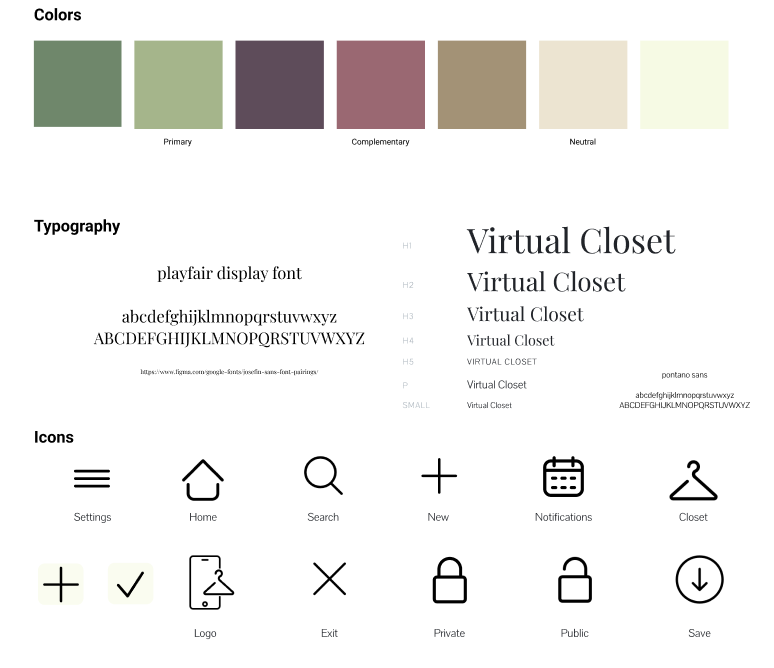
From the inspiration boards and our values, we were able to identify a color palette, font, and several other elements of the design system. We created a library of icons to keep consistency throughout the design, and finalized headings and font sizes in a complete style guide.
Wireframe
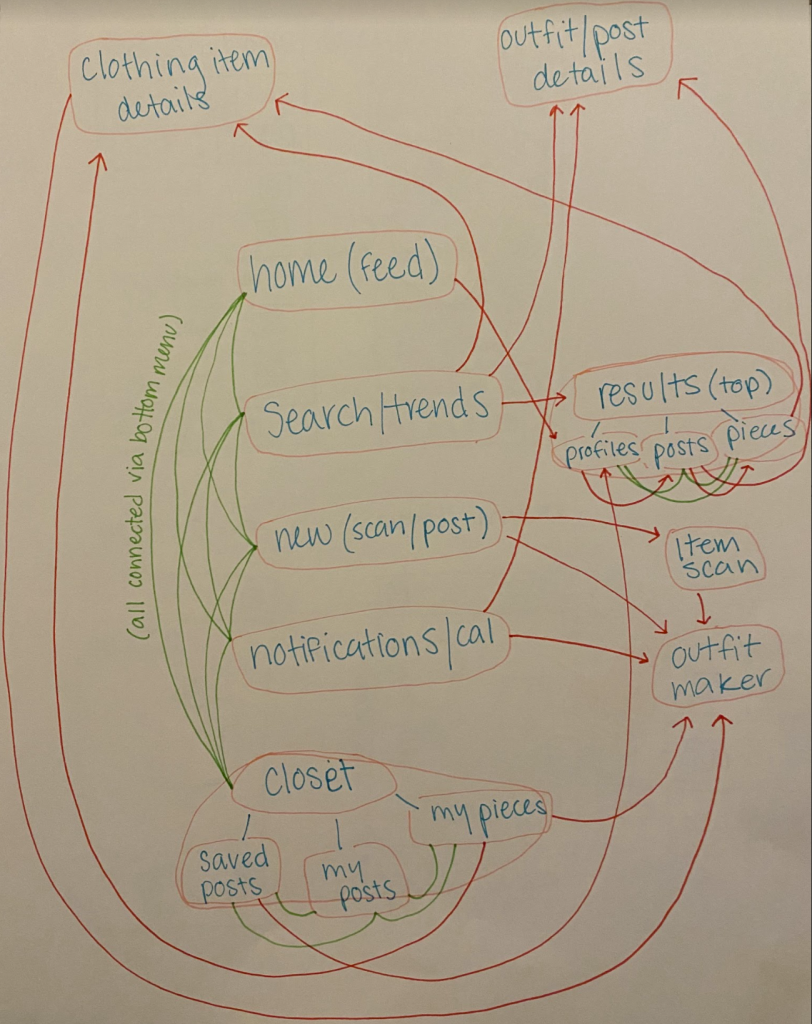
Our wireframe reflected the information we learned during user stories – we separated our features into a navigation bar with 5 pages: home feed, search/trending, add new, notifications/calendar, and the personal closet page. The different user stories helped us identify how the features should be split up. A more social user might only need to visit the home feed and search/trending pages, while a user like Sadie could focus on the calendar and personal closet pages without having to waste screen space on features she didn’t care about as much.
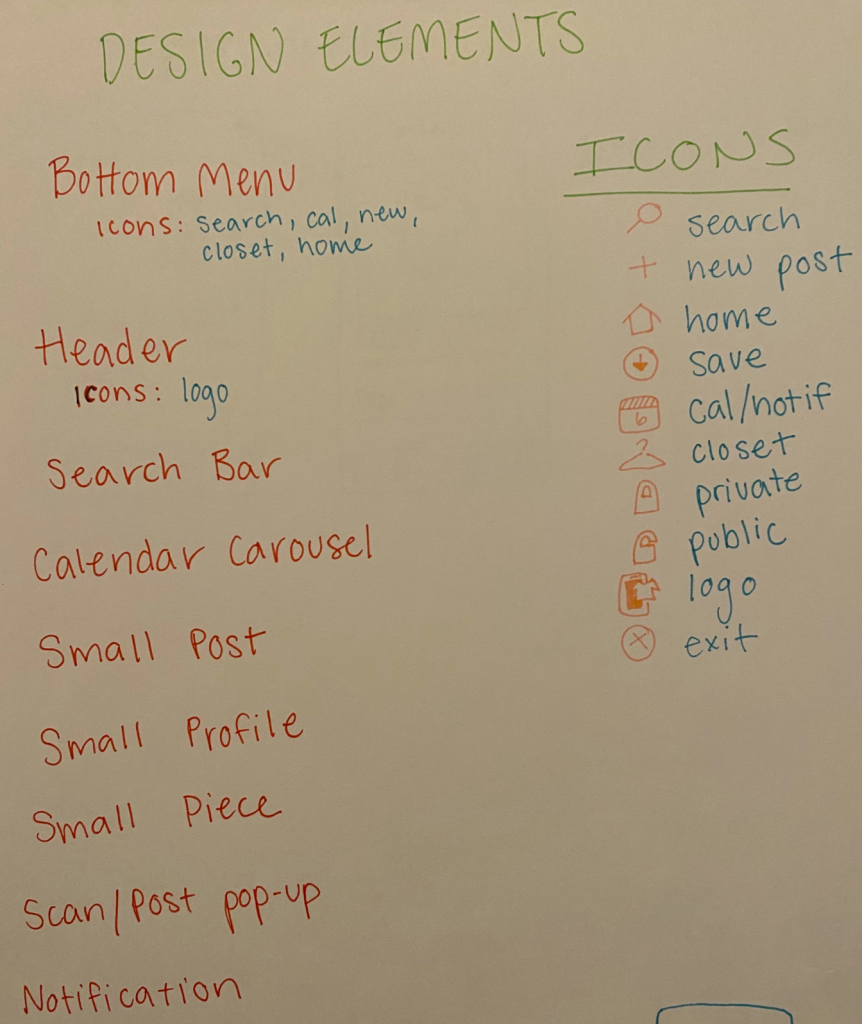
We utilized paper prototyping to cheaply and quickly test out different interfaces. We also created a map of the screens we would need and a list of design elements that would help us with the wireframe later on.
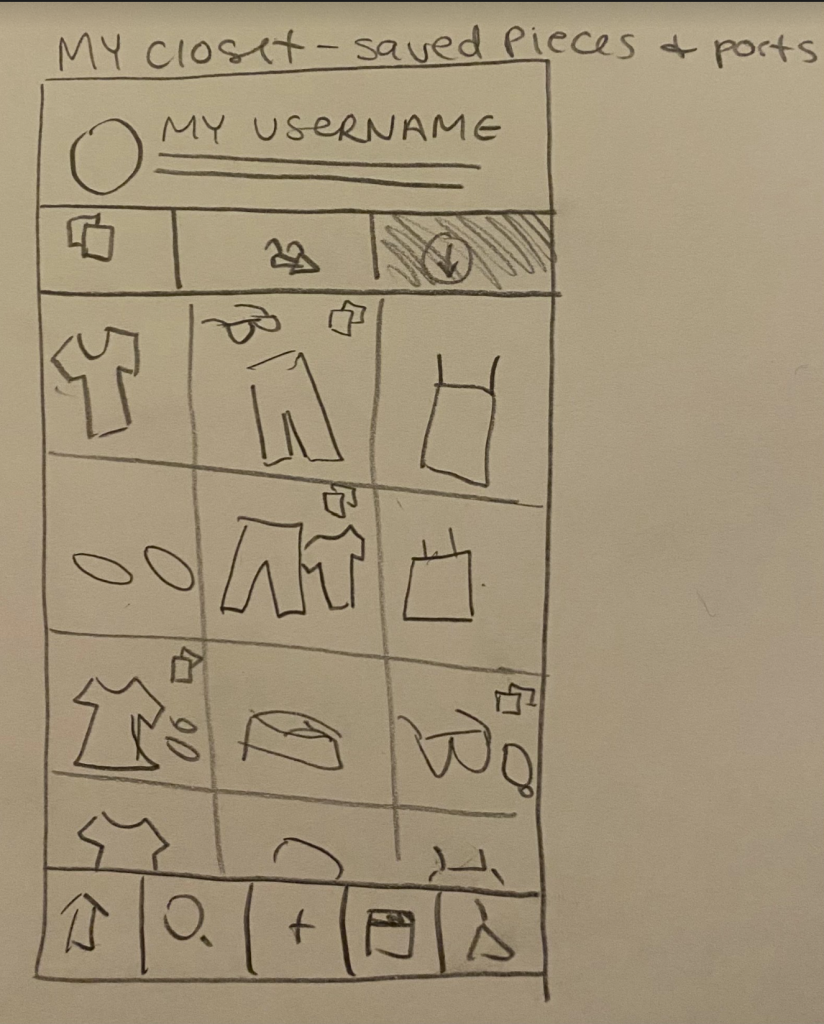
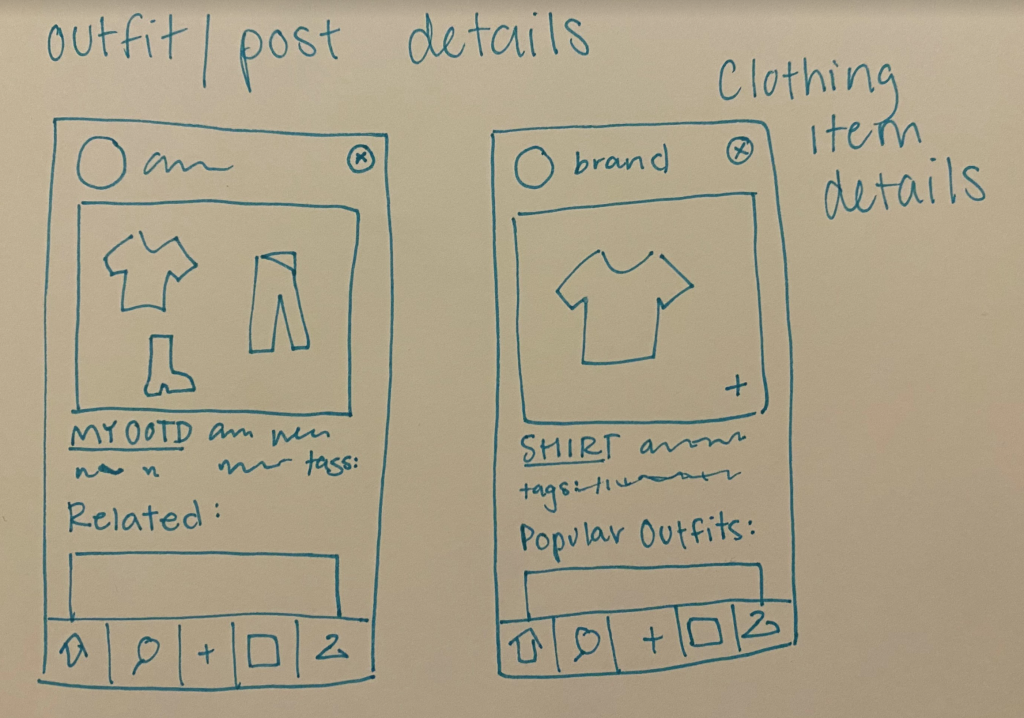
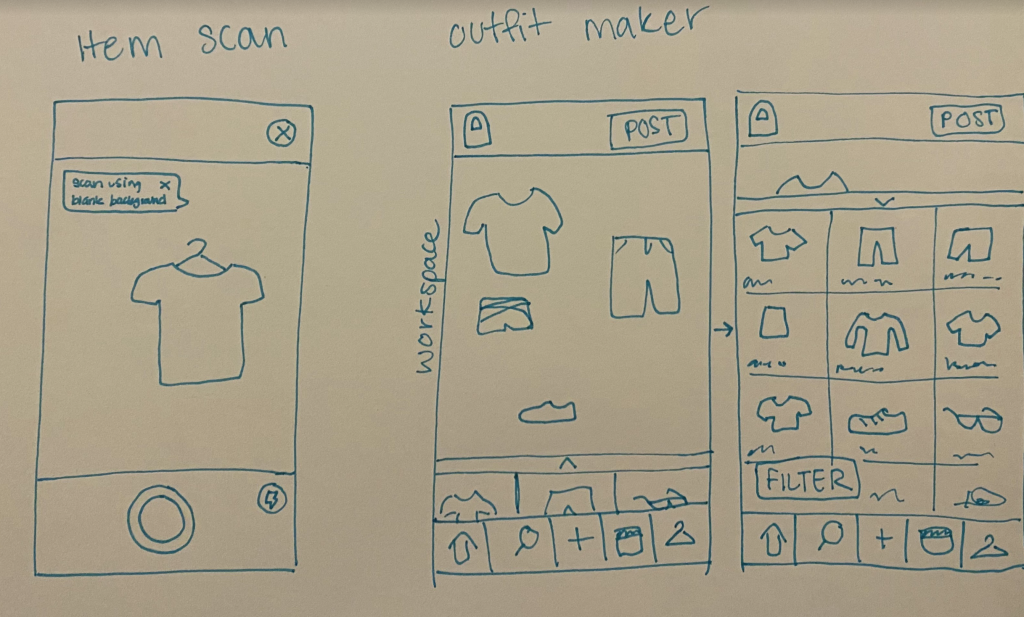
Following the paper prototype, figma made it easy to create a digital version. Drawing from our design system also made this step simple and quick.
User Testing
Based on this primitive wireframe, we conducted user tests with colleagues in our class in order to identify pain points and issues with the interface. Several were identified, including confusion between posts and outfits, issues with the flow of our search function, and readability issues. All of these were discussed and fixed in our final prototype, which can be seen below.